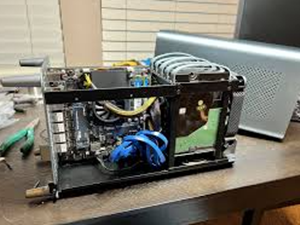
Learn how to build a DIY NAS for home media storage in the U.S. with our step by step instructions, cost examples, and setup tips. Save money, stream movies, and keep files private.
In today’s streaming world, many of us in the U.S. still want a personal home media server to store movies, family videos, music, and photos all in one place. That’s where a DIY NAS (Network Attached Storage) comes in. Instead of paying monthly for cloud storage, you can build your own NAS and access it from your living room, phone, or even while traveling.
If you’ve been asking yourself, “how to build a DIY NAS for home media storage?”, this guide will walk you through everything step by step, with real-life U.S. examples.
Contents
What Is a DIY NAS?
A NAS (Network Attached Storage) is a small computer or box connected to your home network that stores files. Unlike an external hard drive, a NAS is always on, accessible over Wi-Fi or Ethernet, and can serve multiple devices at the same time.
For example:
-
A family in Austin, Texas set up a NAS to stream all their DVDs digitally to a Roku TV.
-
A college student in Boston, Massachusetts built a NAS with recycled parts to back up class projects and stream Spotify playlists locally.
READ ALSO: DIY Invisalign Alternatives at Home in the U.S
Parts You’ll Need for a DIY NAS
To keep costs reasonable, here’s what you need:
-
Computer case or NAS enclosure – Many people reuse an old desktop tower.
-
Hard drives – At least two (for backup or RAID setup). Example: 4TB WD Red drives, about $90 each in U.S. online stores.
-
Motherboard and CPU – Doesn’t need to be powerful; even a used Intel i3 works fine.
-
RAM – 4–8 GB is enough.
-
Operating System (OS) – FreeNAS (TrueNAS) or UnRAID (low-cost).
Step by Step on How to Build a DIY NAS for Home Media Storage
1. Choose Your Hardware
Start with a used PC if you’re on a budget. On Craigslist in Chicago, Illinois, people sell old Dell OptiPlex desktops for $80–$120, perfect for a DIY NAS.
2. Install Hard Drives
Mount your drives in the case. For media, two 4TB drives are a solid start — one for storage, one for redundancy.
3. Pick and Install Software
-
TrueNAS CORE (FreeNAS) – Free and open-source.
-
UnRAID – About $59, easier to manage, great for U.S. beginners.
4. Configure Network Access
Plug the NAS into your router with an Ethernet cable. In Los Angeles, California, many DIYers use mesh Wi-Fi systems so their NAS streams smoothly across the house.
5. Set Up Media Server Software
Install Plex Media Server or Emby. This lets you stream movies and shows to your TV, phone, or tablet.
READ ALSO: Air Return Union Jack Pattern DIY for U.S. Homes
Cost Breakdown on DIY NAS using U.S. Example
A simple DIY NAS can be built for under $400:
-
Used Dell PC: $100
-
Two 4TB WD Red drives: $180
-
FreeNAS OS: Free
-
Miscellaneous cables/fans: $30
Compare that to buying a prebuilt NAS (like Synology or QNAP) for $500–$800 without drives.
Why a DIY NAS Makes Sense for U.S. Homes
-
Privacy: Your files stay local, unlike with Google Drive or Dropbox.
-
Cost savings: One-time build cost vs. monthly cloud subscription.
-
Flexibility: Stream to Roku, Firestick, or even iPhones in different states.
For example, a family in Denver, Colorado uses their NAS to store kids’ school projects, while also sharing a movie collection with grandparents living in Phoenix, Arizona.
Building a DIY NAS for home media storage may sound complicated, but with a little planning, it’s an affordable and rewarding project. Whether you’re in New York City with limited apartment space or on a farm in Kansas with slow internet, having your own NAS means you’re in control of your files.
If you’re asking “how to build a DIY NAS for home media storage”, now you have the answer — and the tools to start today.

Danz has extensive experience as a senior editor at renowned publications like Money, Consumer Reports, Success, and Reader’s Digest. As a writer, his work has appeared in prestigious outlets such as The New York Times, Parade, Smithsonian, National Geographic Traveler, Investopedia, PBS NextAvenue, and Wirecutter. With over seven years of expertise, Danz specializes in personal finance, Sports, Trends and consumer topics, contributing to both major print and online platforms.